Hex Spatial Hashing comes in both 2D and 3D versions, the latter handling hex-shaped volumetric space. Performance is improved over the original Spatial Hashing in part by only having 7 cells to consider instead of 9 (or 21 instead of 27 in 3D), and separate interval updates for static objects since they don't move, and reduced update workload by considering a minimum move distance to trigger rebuilds.
Add the 2D or 3D Hex Spatial Hash component to the same object as Network Manager:
Hex Spatial Hash 3D Component shown in the Inspector In the 2D version, there's a Check Method selector for which axes to use:
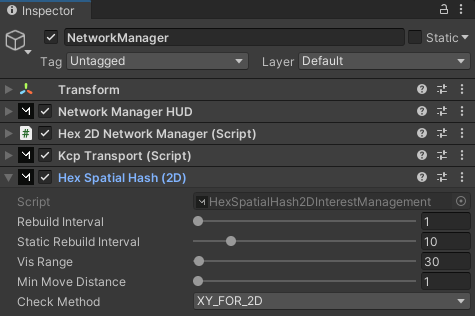
Hex Spatial Hash 2D Component shown in the Inspector Generally, you want to set the Vis Range to around 10% larger than your camera's Far Clip Plane. This lets Mirror spawn things in just before the camera will be able to see it, and let's Unity show your billboarding / higher LOD versions first to minimize the "pop-in" visual artifacts.
Note that the Static Rebuild Interval for static objects is much slower than the normal Rebuild Interval. This is one of the performance improvements, since static objects don't move. We focus more of the workload on the moving player while iterating the static objects for new observers much less frequently.
By setting the Vis Range and the Cell Height, you determine the size of the hex cell volumes around the player, as well as the levels above and below:
Screenshot of Player in 3D Hex Volume In the 2D version, you just set the Vis Range to determine the size of the hexes surrounding the player:
Screenshot of Player in 2D Hex Area We've included examples with Mirror, in the Examples folder so you can try out both versions:
Screenshot of Hex Spatial Hash Example folder